
Google Spreadsheets
Quick Start Guide
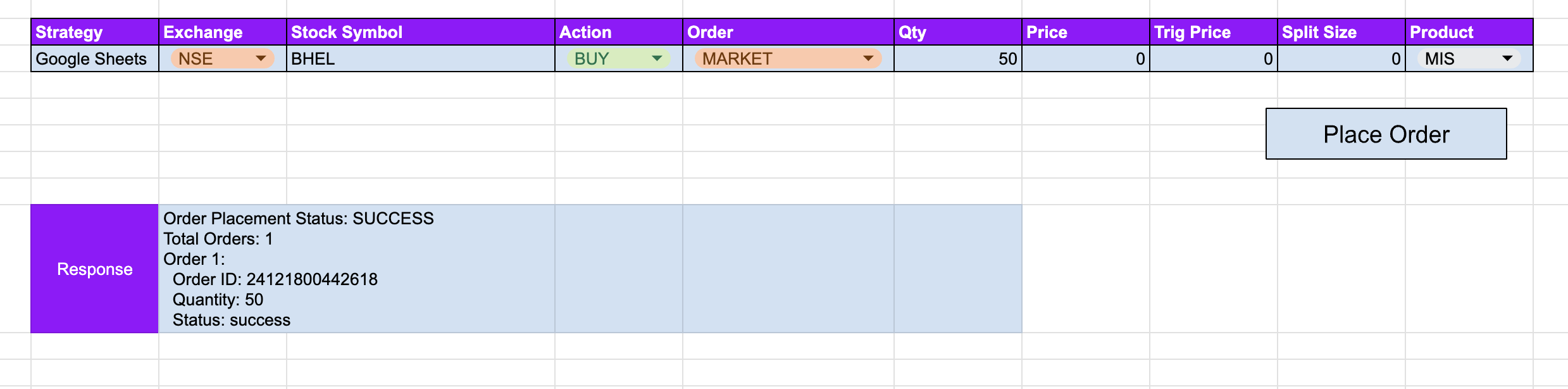
Tradeboard ExcelSheets
Step 1: Clone the Template Spreadsheet
- Open the Tradeboard Trading Template
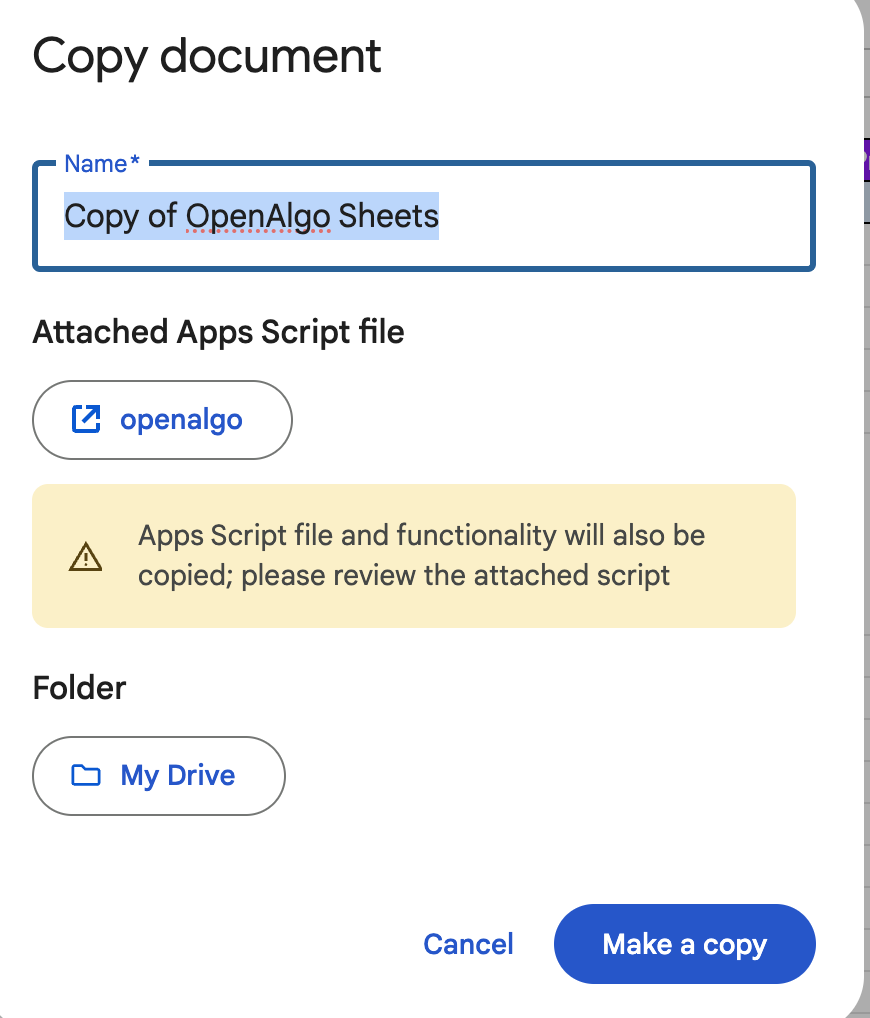
- Click "File" > "Make a copy" to create a duplicate of the spreadsheet.
- In the "Make a copy" dialog, enter a name for your copy of the spreadsheet, such as "My Tradeboard Trading Sheet".
- Ensure the "Folder" is set to your desired location, such as "My Drive".
- Click the "Make a copy" button to create the new spreadsheet.
Step 2: Configure API Settings
- Open the cloned spreadsheet
- Go to Extensions > Apps Script
- Locate these lines in the script:
```javascript
var apikey = "<your-tradeboard-apikey>";
var hostServer = "https://your-ngrok-domain.ngrok-free.app";
```
- Replace with your Tradeboard credentials:
apikey: Your unique Tradeboard API key, generated on the API Key page of the Tradeboard dashboard. This is not your broker's API key.hostServer: The URL where Tradeboard is reachable from Google's servers. Apps Script runs in Google's cloud, sohttp://127.0.0.1:5000will never work. Use a custom domain, or a tunnel such as ngrok, Cloudflare Tunnel or a VS Code Dev Tunnel. Do not leave a trailing slash.
Spreadsheet Structure
The template contains two main sheets:
- PlaceOrder: For entering trade details
- Logs: Automatic logging of trade orders
PlaceOrder Sheet Columns
| Column | Description | Example |
|---|---|---|
| C3 | Exchange | NSE, NFO, CDS, BSE, BFO, BCD, MCX, NCDEX, NCO, NSE_INDEX, BSE_INDEX |
| D3 | Tradeboard Symbol | INFY, RELIANCE |
| E3 | Action | BUY/SELL |
| F3 | Price Type | MARKET/LIMIT/SL/SL-M |
| G3 | Total Quantity | 100 |
| H3 | Price | 1500.50 (used by LIMIT and SL, send 0 otherwise) |
| I3 | Trigger Price | 1480.00 (used by SL and SL-M, send 0 otherwise) |
| J3 | Split Size | 0 - No SplitOrder |
| K3 | Product Type | MIS (intraday), NRML (carry forward), CNC (delivery) |
The values in C3, E3, F3 and K3 are sent to the Tradeboard API exactly as typed, so they must match the API's own vocabulary. product accepts only MIS, NRML and CNC. Words such as INTRADAY or DELIVERY are rejected by the API with a validation error.
Split Order Functionality
- Split Size 0: Entire quantity in one order. The script sends the total quantity as the split size, so the API produces exactly one order.
- Split Size > 0: Multiple orders of the specified size, plus one final order for the remainder if the total does not divide evenly.
- A split order may produce at most 100 child orders. Beyond that the API rejects the request.
- Child orders are placed sequentially, paced from
ORDER_RATE_LIMIT(10 per second by default), so 100 child orders take roughly 10 seconds.
Execution
- Fill in trade details in the PlaceOrder sheet
- Press the PlaceOrder function
- Check response in cell C9
- View detailed logs in the Logs sheet
javascript
function tradeboard() {
  var apikey = "<your-tradeboard-apikey>"; // Replace with your Tradeboard API key
  var hostServer = "https://your-ngrok-domain.ngrok-free.app"; // REPLACE WITH YOUR HOST SERVER

  var baseUrl = hostServer + "/api/v1/splitorder"; // Constructed base URL


  // Fetching parameters from the active sheet
  var strategy = "Google Sheet";
  var exchange = SpreadsheetApp.getActiveSheet().getRange('C3').getValue();
  var symbol = SpreadsheetApp.getActiveSheet().getRange('D3').getValue();
  var action = SpreadsheetApp.getActiveSheet().getRange('E3').getValue();
  var pricetype = SpreadsheetApp.getActiveSheet().getRange('F3').getValue();
  var quantity = SpreadsheetApp.getActiveSheet().getRange('G3').getValue().toString();
  var price = SpreadsheetApp.getActiveSheet().getRange('H3').getValue().toString();
  var trigger_price = SpreadsheetApp.getActiveSheet().getRange('I3').getValue().toString();
  var splitsize = SpreadsheetApp.getActiveSheet().getRange('J3').getValue().toString();
  var product = SpreadsheetApp.getActiveSheet().getRange('K3').getValue();

  // Modify payload based on splitsize
  var payload = {
    "apikey": apikey,
    "strategy": strategy,
    "exchange": exchange,
    "symbol": symbol,
    "action": action,
    "quantity": splitsize === "0" ? quantity : quantity,
    "splitsize": splitsize === "0" ? quantity : splitsize,
    "pricetype": pricetype,
    "product": product,
    "price": price,
    "trigger_price": trigger_price
  };

  Logger.log("Request Payload: " + JSON.stringify(payload)); // Log request payload

  // Sending the split order request
  var response = sendSplitOrder(baseUrl, payload);

  // Format the response for frontend
  var formattedResponse = formatResponse(response);

  Logger.log("Formatted Response: " + formattedResponse); // Log formatted response

  // Update the response in the sheet with formatted response
  SpreadsheetApp.getActiveSpreadsheet().getSheetByName("PlaceOrder").getRange('C9').setValue(formattedResponse);

  // Log order details
  logSplitOrder(response, strategy, exchange, symbol, action, pricetype, quantity, product, price, trigger_price);

  return formattedResponse;
}

function formatResponse(response) {
  try {
    var parsedResponse = JSON.parse(response);

    // If response is successful
    if (parsedResponse.status === "success") {
      var results = parsedResponse.results;

      // Format the response for frontend display
      var formattedLines = [
        "Order Placement Status: " + parsedResponse.status.toUpperCase(),
        "Total Orders: " + results.length
      ];

      // Add details for each order
      results.forEach(function(order, index) {
        formattedLines.push(
          "Order " + (index + 1) + ":",
          "  Order ID: " + order.orderid,
          "  Quantity: " + order.quantity,
          "  Status: " + order.status
        );
      });

      return formattedLines.join("\n");
    } else {
      // Handle error response
      return "Order Placement Failed:\n" +
             "Error Status: " + parsedResponse.status + "\n" +
             "Error Message: " + (parsedResponse.message || "Unknown error");
    }
  } catch (e) {
    // Handle parsing error
    return "Error Formatting Response:\n" + e.message;
  }
}

function sendSplitOrder(url, payload) {
  try {
    var options = {
      'method': 'post',
      'contentType': 'application/json',
      'payload': JSON.stringify(payload)
    };

    var result = UrlFetchApp.fetch(url, options);
    return result.getContentText();
  } catch (e) {
    Logger.log("Error sending split order: " + e.message);
    return JSON.stringify({
      status: "error",
      message: e.message
    });
  }
}

function logSplitOrder(response, strategy, exchange, symbol, action, pricetype, quantity, product, price, trigger_price) {
  try {
    var parsedResponse = JSON.parse(response);
    if (parsedResponse.status === "success") {
      var results = parsedResponse.results;
      var sheet = SpreadsheetApp.getActiveSpreadsheet().getSheetByName("Logs");

      results.forEach(function(order) {
        var row = [
          strategy,
          exchange,
          symbol,
          action,
          pricetype,
          quantity,
          product,
          order.orderid,
          order.quantity,
          order.status,
          price,
          trigger_price,
          new Date()
        ];
        sheet.appendRow(row);
      });
    } else {
      Logger.log("Error in response: " + response);
    }
  } catch (e) {
    Logger.log("Error logging split order: " + e.message);
  }
}

function clearLogs() {
  var sheet = SpreadsheetApp.getActiveSpreadsheet().getSheetByName("Logs");
  var lastRow = sheet.getLastRow();
  if (lastRow > 1) {
    sheet.getRange(2, 1, lastRow - 1, sheet.getLastColumn()).clearContent();
  }
}
Troubleshooting
Common Issues
- API Key Invalid
- Verify key in Tradeboard dashboard
- Check network connectivity
- Ensure API key has trading permissions
- Host URL Incorrect
- Confirm exact URL from Tradeboard platform
- Check for any trailing slashes
- Verify ngrok or custom endpoint
- Permissions
- Accept Google Sheets script permissions
- Verify API key authorization
Security Notes
- Keep API key confidential
- Use secure, unique API keys
- Regularly rotate credentials
- Monitor trading activities